Computer Repair & IT Services · Canandaigua, NY

Practical Technology Help for Home and Small Business

Canandaigua Computer Service helps with computer problems, new setups, Wi-Fi and networking, data, cybersecurity, and everyday IT needs. We support home users and small businesses throughout Canandaigua and surrounding Finger Lakes communities.

Whether you know exactly what service you need or simply know something is not working, tell us what is happening. We will help identify a sensible next step.

Explore services

Find the right service for your situation.

Choose a service to see what it includes and how CCS can help.

Repair, security, and data

Computer Repair & Troubleshooting

CCS diagnoses slow computers, startup failures, crashes, software errors, hardware problems, and Windows or macOS issues. We identify the likely cause before recommending a practical repair or another option.

Common needs: Slow Computers • Startup Problems • Crashes • Software Issues • Hardware Problems

Explore Computer Repair
Virus & Malware Removal

CCS checks for malware, browser hijackers, unwanted programs, and suspicious pop-ups. Cleanup includes reviewing affected settings and recommending practical steps to reduce repeat problems.

Common needs: Malware • Adware • Browser Hijackers • Suspicious Pop-ups • Security Cleanup

Explore Malware Removal

Computer Upgrades & Hardware

Storage, memory, and other hardware work can improve performance or extend a computer’s useful life. CCS can help determine whether an upgrade, repair, or replacement makes the most sense.

Common needs: SSD Upgrades • RAM • Storage • Power Supplies • Cooling • Displays

Explore Hardware & Upgrades

Data Recovery, Transfer & Backup

Get help recovering accessible data when possible, moving files between devices, and setting up a practical backup routine. Recovery options depend on the condition of the device and storage.

Common needs: File Recovery • Data Transfer • PC Migration • External Storage • Backup Setup

Explore Data Services

Setup and connectivity

Computer Setup & Migration

Get a new Windows PC or Mac ready for everyday use. CCS can help configure accounts and software, connect peripherals, and move appropriate files and settings from an older computer.

Common needs: New Computers • Accounts • Software • File Migration • Printers

Explore Setup & Migration

Wi-Fi & Network Support

CCS troubleshoots unreliable connections, routers, Wi-Fi coverage, Ethernet, and connected devices for homes and small businesses.

Common needs: Wi-Fi • Routers • Coverage • Ethernet • Connectivity • Network Devices

Explore Wi-Fi & Networking

Ongoing support and guidance

Home Computer & IT Support

Personal help with computers, printers, software, Wi-Fi, and other connected devices. You do not need to know which specialist service applies before reaching out.

Common needs: Home Computers • Printers • Software • Devices • Setup • Troubleshooting

Explore Home IT Support

Small Business IT Support

Flexible support for workstations, networks, new equipment, troubleshooting, maintenance, and planned technology changes for small businesses.

Common needs: Workstations • Networks • Setup • Maintenance • IT Planning

Explore Business IT

IT Consulting & Technology Guidance

Independent advice on what to buy, repair, upgrade, replace, or plan next. Recommendations are based on the way you actually use your technology.

Common needs: Buying Advice • Upgrades • Replacement Planning • Technology Decisions

Explore IT Consulting

Personal cybersecurity

Personal Cybersecurity Services

One-on-one help improving account, password, device, and identity security, including assistance after a scam or suspected account compromise. Computer malware cleanup is covered separately above.

Common needs: Account Security • Passwords • Device Protection • Scam Help • Identity Guidance

Explore Cybersecurity Services
How CCS works

Clear answers before the next step.

We start with the problem you are experiencing and explain the available options.

  1. Describe the issue

    Tell us what you have noticed and what you have already tried.

  2. Find the likely cause

    We consider the computer, software, network, accounts, and connected equipment involved.

  3. Discuss your options

    We explain the recommended work, including when repair, an upgrade, or replacement makes more sense.

  4. Choose a service method

    We confirm whether onsite, pickup and drop-off, or remote help fits the job.

Flexible support

Service that fits the problem.

The right option depends on the issue, equipment, and location. CCS will help determine what works.

Onsite service

Help at your home or business when the issue involves the installed setup, such as Wi-Fi, printers, workstations, or connected equipment.

Pickup & drop-off

Scheduled collection and return for repairs that need extended diagnostics, hardware work, or other offsite attention.

Remote support

Help with compatible software, settings, configuration, or troubleshooting that can be handled without a visit.

Local technology support

Computer Repair & IT Support Around Canandaigua

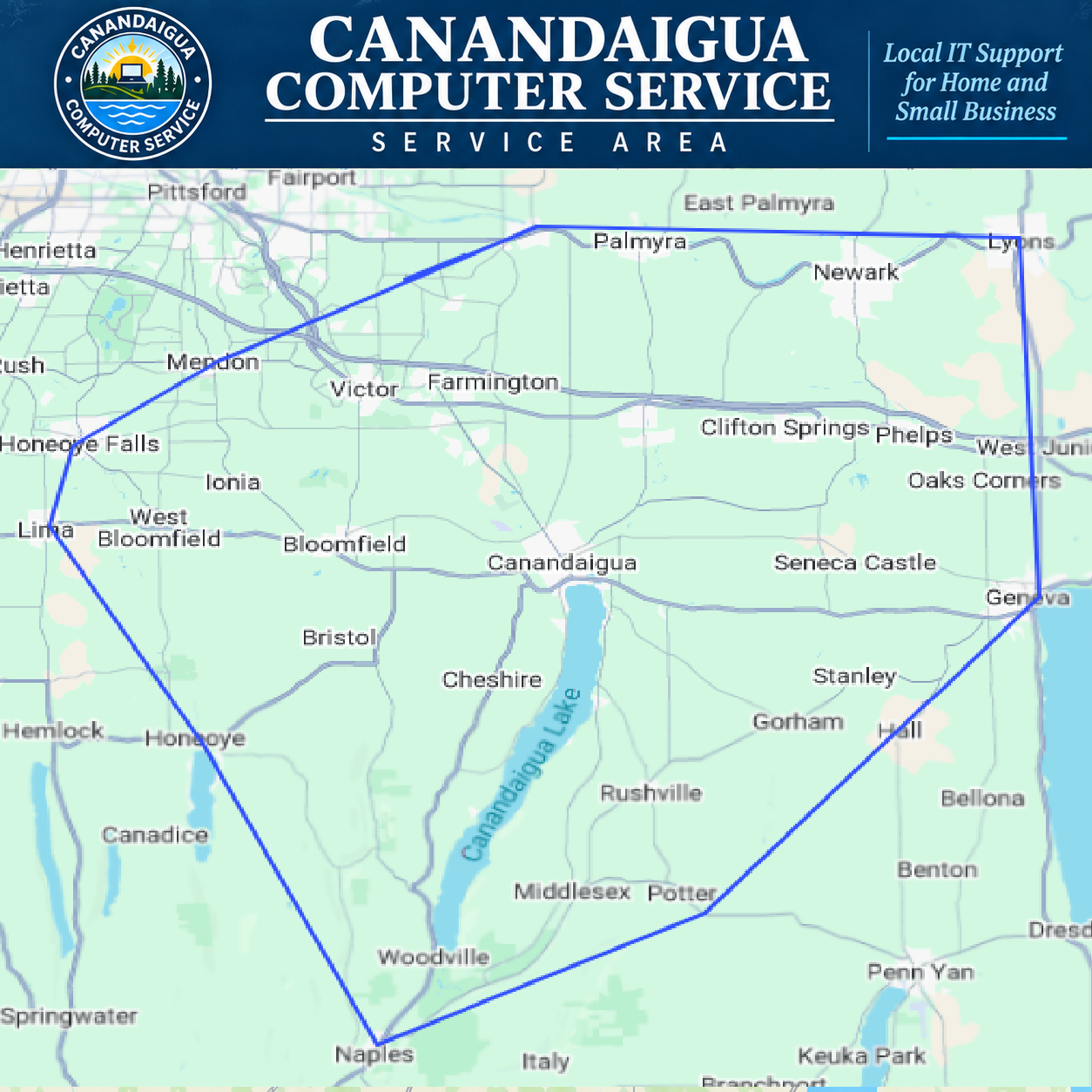
Based in Canandaigua, CCS provides mobile computer repair and IT support throughout Ontario County and nearby Finger Lakes communities, including Victor, Farmington, Geneva, Bloomfield, Phelps, Naples, and areas around Canandaigua Lake. Select service is available in parts of Wayne, Yates, and Seneca counties.

Explore the Full Service Area →
Map of the CCS coverage area centered on Canandaigua
Need help?

Not Sure Which Service You Need?

Tell us what your technology is doing, when the problem started, and where you are located. We will help determine the appropriate service and support option.